
Most security teams do not set out to run their SIEM across several machines. They arrive there.
It usually starts with growth. A second site comes online. A subsidiary in another country needs covering. A retention rule says certain records cannot leave the region that produced them, so storage has to sit closer to where the logs are generated. The deployment spreads out to follow the organisation, and each of those decisions is sound on the day it is made.
The cost arrives later, and it arrives in the daily work. Adding a new log source stops being one job and becomes the same job repeated in several places. Confirming it worked means going back and checking each one. None of that is difficult, which is exactly why it goes unexamined. It just accumulates until simple administration tasks take more time than high-priority security work.
Cloud-mediated platforms answered this by moving the controls into their own cloud. If you are comfortable with where that cloud sits, and with what the bill does as your volume grows, it remains a reasonable choice. But not everyone appreciates having their architecture linked to a cloud vendor's roadmap.
Guardsix SIEM 7.10 takes another route. It builds for the deployment you actually have, so the work of running it becomes simpler even as your organisation grows.
What changes in Guardsix SIEM 7.10
- Add a log source from one place, however many machines the deployment spans, and see what each one reports back
- Onboard Office 365 tenants through an API instead of repeating the same interface work for every tenant
- Start from a curated detection baseline rather than an empty rule set, with 60+ rules covering Windows, Active Directory, Microsoft 365, and Azure
- Keep your incident counts accurate when incidents arrive from an external detection tool
Everything in this release is designed for self-hosted deployment. There are no cloud-only carve-outs, and that is the difference a self-hosted roadmap pursued by a vendor actively investing in on-premises engineering.
Here is a summary of the capabilities the latest version of Guardsix SIEM offers:
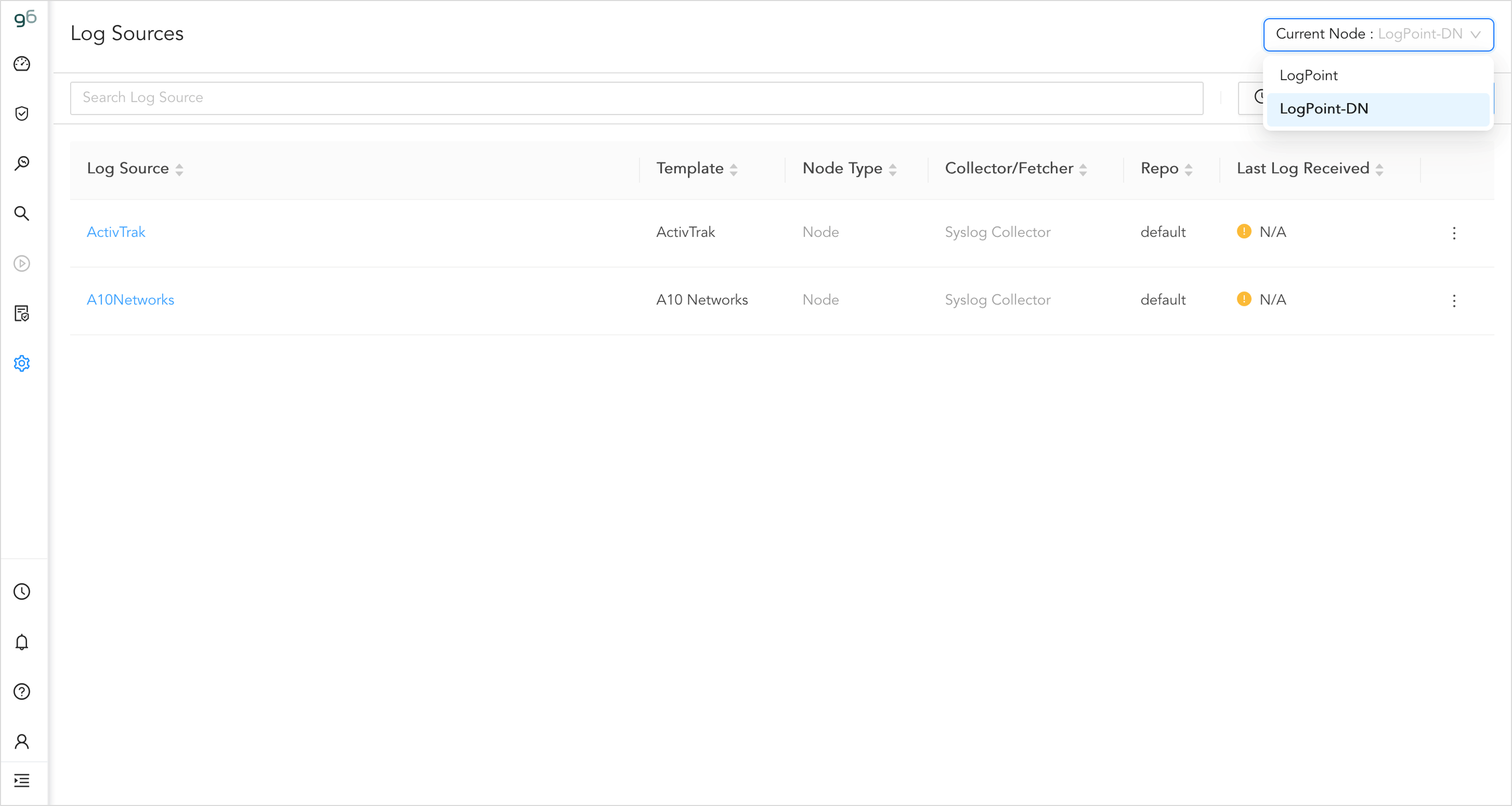
Add your log sources once, not once per machine
You add a log source once, from the search head, and it lands wherever you told it to go. You do not repeat the job for each machine, and you do not go back afterwards to find out whether it took.
Those machines are called nodes, and the search head is the node you work from. The mechanism is a node selector in the create flow with per-node reporting on the way back. Since each node answers for itself, the confirmation you get names the machines rather than summarising them.
In practice that means less repetition and less guessing. You set a source up once, each machine confirms for itself, and you can see where it landed without having to search for it. Changing a source works the same way. You can change and check sources from the same place, and every action leaves an audit trail.
A detection baseline you can inspect and version
Every new SIEM arrives with an empty rule set, and someone has to fill it. For a team of three or four that is weeks of work before the first useful alert, and it does not end at go-live, because rules written once in a console are rules nobody can review, compare, or roll back.
7.10 changes both halves of that: what a lean team starts with, and what happens to the content afterwards.
The Day-1 Detection Pack offers a curated starting point
Guardsix SIEM now ships with 60+ rules across Windows, Active Directory, Microsoft 365, and Azure. Our researchers chose from among the log sources most of our allies prioritise first. Curating a smaller set your team can immediately use is worth more than a large set that requires additional tooling. Pack lifecycle management runs through the SDK and CLI, so updates are a managed action rather than a re-import, and you decide which rules go live and when.
Picture a municipal IT team of four bringing a new deployment online eight weeks before an audit. They have hundreds of available rules and no basis for choosing between them. Enable everything and the alert queue is unusable by Friday. Enable a handful and the audit finds gaps.
The pack removes the guess. You start from a position someone else has already reasoned about: the rules arrive as files, you review them, you enable what fits your estate, and you update the pack as a managed action through the SDK and CLI.
What changes is that time to first useful alert stops depending on how many hours your team can spare. Curated content shipped for an on-prem deployment clearly shows the difference between on-prem under active development rather than maintenance mode.
Rules that live in files instead of a console
7.10 adds CLI tooling, an enriched YAML schema, and distribution across multiple instances. Alongside it, our out-of-the-box detection content is being published as an open repository.
An incident review eventually asks a question that sounds simple: which version of this rule was live on 14 March? A console answers with today's rule. A repository answers with the commit.
That is the practical difference. Rules authored in YAML, reviewed before they deploy, rolled back when one misfires, and versioned so the answer comes from your own history rather than from memory. Because the content is open, you can also read a rule before you trust it — detection logic you cannot inspect is detection logic you are taking on faith, and that position gets harder to hold the more of your NIS2 evidence rests on showing what your controls actually do.
What changes is that your detection estate becomes reviewable, versioned, and portable. Held on your side of the boundary, in files you own.
Alert context an analyst can act on at 2:00 am
ATT&CK v17.1 support carries detection strategies, the analytics behind them, the data components they draw on, and version tracking — all on the alert itself.
A single analyst is on shift at a regional utility. An alert fires, tagged with a technique. That tag names the event. On its own it does not say how to confirm it, or what to look at next. A team with a threat intelligence function fills that gap internally. A team of six does not have one.
Now the alert carries the reasoning rather than only the conclusion. The analyst can see what the detection is looking for and why, which shortens the distance between an alert firing and someone knowing whether it matters.
Version tracking means you can also say which schema a rule was authored against — the same audit question as above, asked of your metadata. For a lean team, context that ships with the alert is context you do not have to staff.
Cortex XDR integration: one incident in, one incident out
When two unrelated incidents from an external detection tool arrive as one, somebody must reconcile them by hand. Guardsix SIEM 7.10 includes a new integration for Palo Alto Cortex XDR that maps incidents one to one, pulling on an interval you set. Accurate counts ensure that the numbers analysts report are true.
The numbers start mattering at the end of a quarter. A regional health board runs Cortex XDR on endpoints and Guardsix SIEM for log management and audit evidence. Someone asks how many incidents were raised and closed. Under merged mapping the answer is wrong in a way nobody can easily see: the count runs low, and two separate events sit inside one record. Somebody has to go back through and pull them apart.
That reconciliation is time a team of six or seven does not have, but the count is the number that team reports. Incident records feed audit evidence and, for organisations in scope, the reporting your obligations under NIS2 depend on. A number you cannot stand behind costs more than the hours it took to produce.
What changes is that the correlation is accurate without a person in the middle. The integration is built on the Universal REST API Fetcher, so it behaves like the other fetch-based integrations your engineers already know.
Advisory: Root CA certificate expires on 1 January 2027
One item in this release needs a place in your plan starting today.
The root CA certificate that secures communication between Guardsix components expires on 1 January 2027. After that date, components still relying on it cannot establish trusted connections with each other. There is a path for every supported version, and there is time to act before the cut-off date.
Ensure a smooth handover by updating for the version you run today:
| If you are running | What to do |
|---|---|
|
Guardsix SIEM 7.10 |
No action needed. The renewed certificate ships with the release. |
| Guardsix SIEM 7.7 to 7.9 | Install the Root CA Update plugin, v1.0.0. It installs the renewed certificate without a full product upgrade, so you can stay on your current release. |
| Guardsix SIEM 7.6 and earlier | Upgrade to a supported release first, then follow the path for that version. |
Important: Guardsix Fleet users must update the Root CA certificate before updating SIEM. Find out which path applies to you on our Root CA certificate support page.
