Windows Management Instrumentation (WMI) is Microsoft’s implementation of the Common Information Model (CIM), a standard way to describe and interact with management data on Windows systems. Administrators use it to query system information, run processes and scripts, and react to system events, on the local machine or on a remote one.
WMI components
WMI uses several components together to manage and interact with Windows resources.
- Clients (management applications)
These are the clients that request information or actions from WMI. Examples include PowerShell, administrative scripts and tools such aswmic.exe. A client sends a request to read data, run a method, or subscribe to an event.
Microsoft has removed the WMIC command-line utility (
wmic.exe) from Windows 11 24H2 and 25H2 as of the September 2026 Security Update. - CIM Repository
This is WMI’s reference library. It is a database on disk under%SystemRoot%\System32\wbem\Repository. It holds class definitions and persistent objects that WMI uses to provide management functionality.
Class definitions describe the types of objects WMI can work with, such as processes or services. Each definition can include:- Properties: Fields containing information about an object. For example,
Win32_ProcessexposesName,ProcessId, andCommandLine. - Methods: Supported actions, such as
Createto start a process orTerminateto stop one. - Qualifiers: Metadata about the class or its members, such as which property uniquely identifies an object, or which provider serves the class.
Persistent instances are objects saved in the repository that remain across reboots. Permanent WMI event subscriptions use these stored objects to preserve their filters, consumers, and bindings after the application that created them exits. - Properties: Fields containing information about an object. For example,
- WMI Providers and WmiPrvSE.exe
WMI providers retrieve live system data and perform requested actions. They connect WMI classes to the underlying Windows components. For example, supplying process information throughWin32_Process, service information throughWin32_Service, and network adapter information throughWin32_NetworkAdapter. Their registration details are stored in the WMI repository so WMI can locate the appropriate provider.
Most providers are loaded on demand intoWmiPrvSE.exe, the WMI Provider Host. Multiple instances can run simultaneously under accounts such as SYSTEM, LOCAL SERVICE, or NETWORK SERVICE, depending on the providers’ hosting requirements. - WMI Service (winmgmt)
The WMI service coordinates requests between clients, the repository, and providers. It normally runs within asvchost.exeservice-host process.
When a request arrives, WMI determines how to handle it. Information already stored in the repository can be retrieved there. Requests for current system information or supported actions are passed to the appropriate provider. The results are then returned to the client. - Namespaces
Namespaces organize WMI classes into named groups, much like folders organize files. A client connects to a namespace to access the classes available there. Each namespace has its own set of classes and providers.
Common examples include:
| Namespace | Typical purpose |
|---|---|
root\cimv2 |
Common Windows management classes covering processes, services, the operating system, and hardware. |
root\subscription |
The recommended location for permanent event subscriptions, including their filters, consumers, and bindings. |
root\default |
Includes access to registry-related functionality through the Registry Provider. |
Namespaces provide both organization and an access-control boundary: permissions help determine who can connect and which operations they can perform.
Putting it together
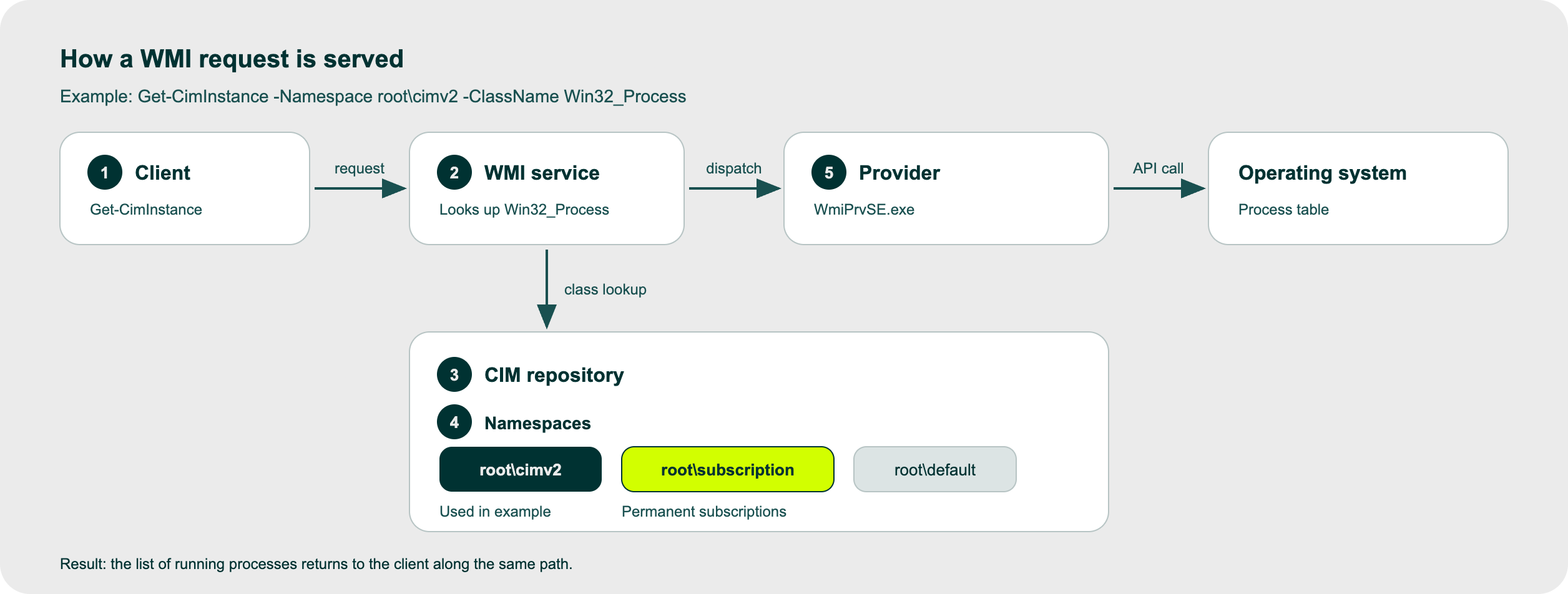
Suppose a client runs Get-CimInstance -Namespace root\cimv2 -ClassName Win32_Process:
- PowerShell (the client) sends the request to the WMI service, locally over COM or remotely over DCOM or WinRM.
- The service finds
Win32_Processin theroot\cimv2namespace of the repository, which says which provider serves it. - The service loads that provider into
WmiPrvSE.exeif it isn’t already running. - The provider reads the real process table and returns the live list to the service.
- The service passes the result back to the client.
How the request is phrased: WQL
WMI clients retrieve information using WQL (WMI Query Language), a query language with syntax similar to SQL.
For example:
SELECT * FROM Win32_Process WHERE Name = 'notepad.exe'
This asks WMI to return the available properties of running processes named notepad.exe. Here, Win32_Process identifies the class, while WHERE limits the results to matching instances.
WMI processes the request and obtains the information from the appropriate provider. The results return as objects whose properties the client can display, filter, or use in further operations.
Eventing
WMI eventing is a mechanism in Windows Management Instrumentation (WMI) that allows applications and administrative scripts to receive notifications when specific system events or changes occur, such as a process starting, a service stopping, or available disk space falling below a defined threshold.
WMI supports both temporary (in-process, transient) and permanent event subscriptions.
- Temporary subscriptions remain active while the subscribing client maintains them. They are removed when the client disconnects or exits.
- Permanent subscriptions are stored in the WMI repository itself and survive client termination and system reboots. They typically consist of three linked objects in the
root\subscriptionnamespace: an event filter that defines what to watch for, an event consumer
Once the WMI service is running after a reboot, permanent subscriptions can respond to matching events again without the original client being present. This makes them useful for administrative automation, but also gives attackers a way to maintain persistence through WMI objects.
How attackers use WMI
WMI is built in, present on every Windows host and used by administrators, so malicious use blends in with normal activity. Red Canary ranks it seventh among the techniques it detects most in its Threat Detection Report. Attackers use it to:
- Execute commands remotely and move laterally using tools such as
wmicor Impacket’swmiexec. - Gather information about the system and its environment, including installed antivirus products, group membership, and domain details.
- Weaken recovery and defences. Ransomware operators delete volume shadow copies through WMI, and some actors stop the firewall service.
- Persist. Permanent event subscriptions keep code running across reboots.
Each of these deserves its own treatment, and we will cover them in upcoming posts. This post stays on persistence through WMI eventing, how attackers use it, and the telemetry that helps detect it.
Persistence: WMI Event Subscription
Attackers set up Permanent WMI Event Subscriptions, which run when specific system conditions or triggers occur. The commonly abused command and script consumers run in the background under NT AUTHORITY\SYSTEM. Depending on how the payload is stored and executed, this can work without dropping a separate malicious executable to disk.
Unlike a temporary subscription, which ends when the subscribing client disconnects or exits, a permanent subscription is saved in the WMI repository (C:\Windows\System32\wbem\Repository). It stays registered after its creator exits and survives reboots, because WMI reloads it from the repository each time the service starts.
Setting up subscriptions requires local administrator privileges or SYSTEM access on the target machine. Attackers may already have gained this access earlier in the attack, for example through privilege escalation or stolen administrator credentials.
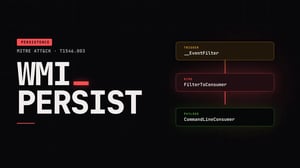
A permanent WMI subscription requires three linked objects stored in the root\subscription namespace (Microsoft’s recommended namespace for permanent subscriptions) of the WMI repository:
- Event Filter (
__EventFilter): A WQL (WMI Query Language) query that defines the trigger condition. Common triggers include system startup (Win32_ProcessStartTrace), a user logging in, or a set timer. - Event Consumer (
__EventConsumer): The payload or action executed when the filter condition is met. The two most commonly abused consumer types are:CommandLineEventConsumer: Executes a direct command line or executable.ActiveScriptEventConsumer: Executes VBScript or JScript payloads directly in memory.
- Filter-to-Consumer Binding (
__FilterToConsumerBinding): The administrative link that joins the Event Filter to the Event Consumer.
What happens when the subscription fires
When an event matches the filter’s query, WMI invokes the bound consumer. The process activity depends on the consumer type.
CommandLineEventConsumer is the one consumer type whose purpose is to execute an arbitrary command line when its bound __EventFilter condition matches. Its ExecutablePath and CommandLineTemplate properties specify the executable and command line. The new process typically appears as a child of the WmiPrvSE.exe instance hosting the consumer, making this relationship useful for detection.
ActiveScriptEventConsumer doesn’t start a binary directly. It runs a VBScript or JScript payload inside scrcons.exe, the WMI Standard Consumer Scripting Host. The script can be embedded in the consumer's ScriptText property or referenced as a file through ScriptFileName.
Because scrcons.exe is activated through COM, it commonly appears as a child of svchost.exe hosting the DcomLaunch service. Its execution, especially unexpected child processes provides another useful investigation point.
Mandiant’s analysis of POSHSPY, a backdoor attributed to APT29, shows how WMI can provide both payload storage and persistence.
APT29 created a custom WMI class and stored an encrypted, Base64-encoded PowerShell backdoor in one of its text properties. A permanent event filter was bound to a CommandLineEventConsumer that launched an encoded PowerShell command. That command retrieved the stored backdoor, decrypted it, and executed it directly from memory. In observed configuration, the filter triggered at a particular time on selected days of the week.
The subscription and stored payload used names resembling Windows components. Mandiant reported that this installation left no payload files outside the WMI repository, making it harder to identify through traditional file-based host analysis.
Detection with guardsix SIEM
Required log sources
- Windows
- Enable Audit Process Creation and Include command line in process creation events to collect Event ID 4688 with command-line details.
- Auditing details for ETW provider
Microsoft-Windows-WMI-Activity.- Enable or check WMI-Activity/Operational event log (
Applications and Services Logs > Microsoft > Windows > WMI-Activity > Operational) for Event ID 5857–5861 to trace WMI namespace, consumer, and provider activity.
- Enable or check WMI-Activity/Operational event log (
- Windows Sysmon
- Configure collection of Event 1 for process creation, 11 for file creation or overwriting, and 19, 20, and 21 for WMI filter, consumer, and binding activity.
- To get started, you can use our sysmon baseline configuration.
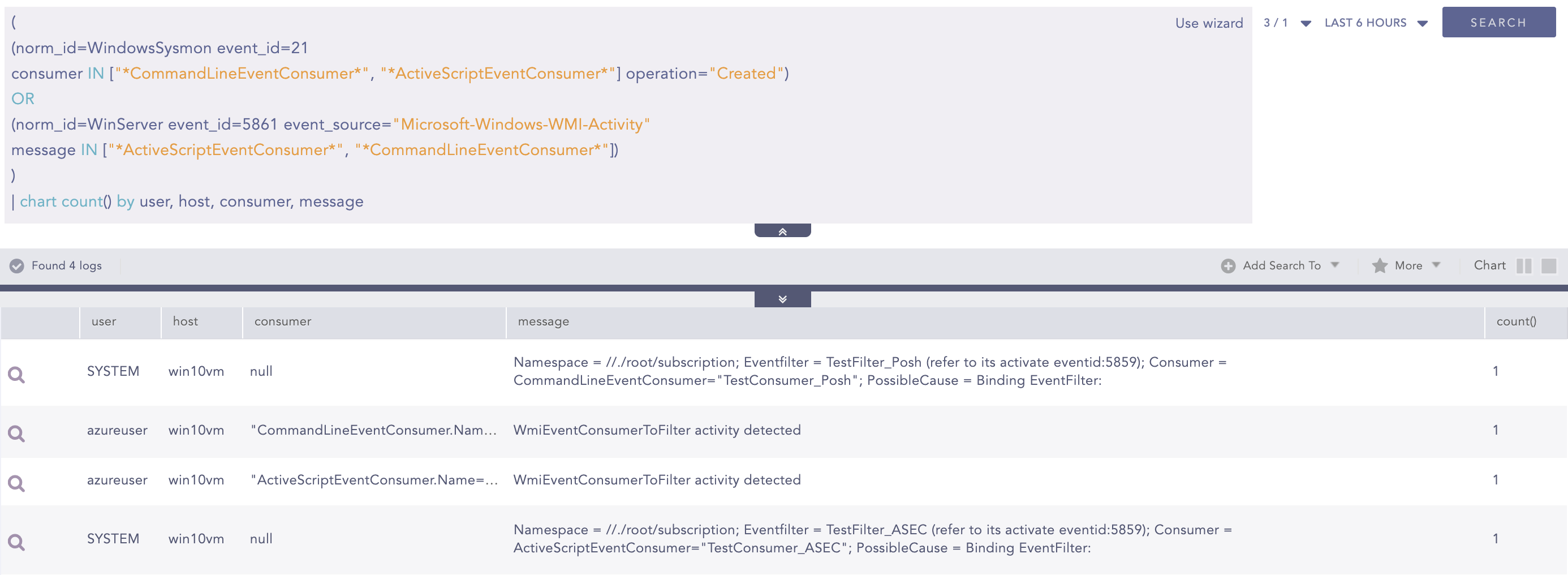
Alert: WMI Event Subscription Created
A permanent subscription connects an event filter to a consumer through a __FilterToConsumerBinding object. This binding associates the monitored condition with the action WMI should perform.
This alert detects newly created bindings referencing CommandLineEventConsumer or ActiveScriptEventConsumer through Sysmon Event 21. It also checks WMI-Activity Event 5861 for references to either consumer type. These are the two execution-capable consumers described in the persistence section: one launches a command or executable, while the other runs a script.
Sysmon Events 19 and 20 can provide additional context about the associated filter and consumer.
(
(norm_id=WindowsSysmon event_id=21
consumer IN ["*CommandLineEventConsumer*", "*ActiveScriptEventConsumer*"] operation="Created")
OR
(norm_id=WinServer event_id=5861 event_source="Microsoft-Windows-WMI-Activity"
message IN ["*ActiveScriptEventConsumer*", "*CommandLineEventConsumer*"])
)
Alert: Suspicious WMPRVSE Child Process
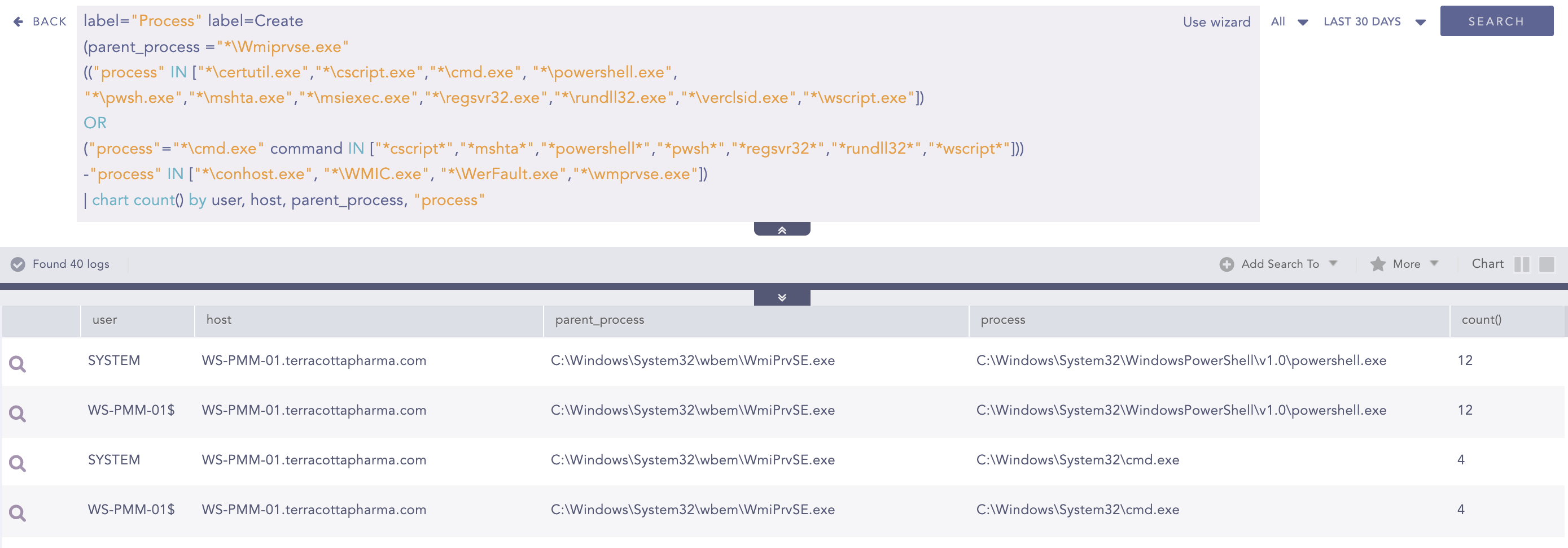
When a CommandLineEventConsumer runs its configured command, the launched process typically appears as a child of WmiPrvSE.exe.
This alert identifies shells, scripting engines, and execution utilities launched directly by WmiPrvSE.exe. It provides visibility into suspicious WMI execution.
Similar activity can occur during legitimate administration, such as using WMI to run a PowerShell troubleshooting script, execute a maintenance batch file, or install software. Connecting the observed command to a suspicious subscription strengthens the evidence that the activity came from the persistence mechanism described above.
label="Process" label=Create
(parent_process ="*\Wmiprvse.exe"
(("process" IN ["*\certutil.exe","*\cscript.exe","*\cmd.exe", "*\powershell.exe", "*\pwsh.exe","*\mshta.exe","*\msiexec.exe","*\regsvr32.exe","*\rundll32.exe","*\verclsid.exe","*\wscript.exe"])
OR
("process"="*\cmd.exe" command IN ["*cscript*","*mshta*","*powershell*","*pwsh*","*regsvr32*","*rundll32*","*wscript*"]))
-"process" IN ["*\conhost.exe", "*\WMIC.exe", "*\WerFault.exe","*\wmprvse.exe"])
Alert: WMI Persistence - Script Event Consumer Detected
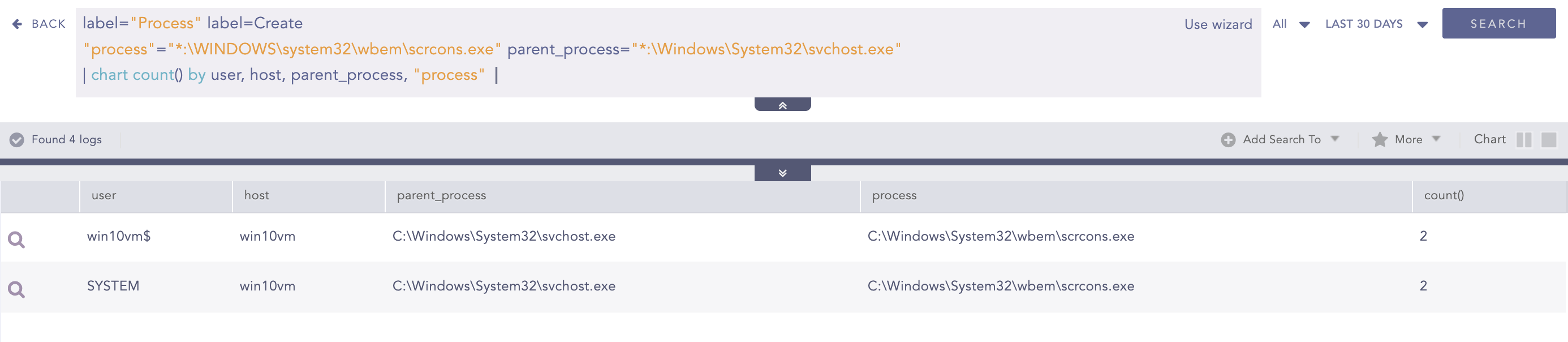
An ActiveScriptEventConsumer runs VBScript or JScript through scrcons.exe, the WMI scripting host. The script can be embedded in the consumer or loaded from a script file.
The following alert detects scrcons.exe starting from its standard Windows location with svchost.exe as its parent. This can indicate execution through a permanent WMI event subscription.
label="Process" label=Create
"process"="*:\WINDOWS\system32\wbem\scrcons.exe" parent_process="*:\Windows\System32\svchost.exe"
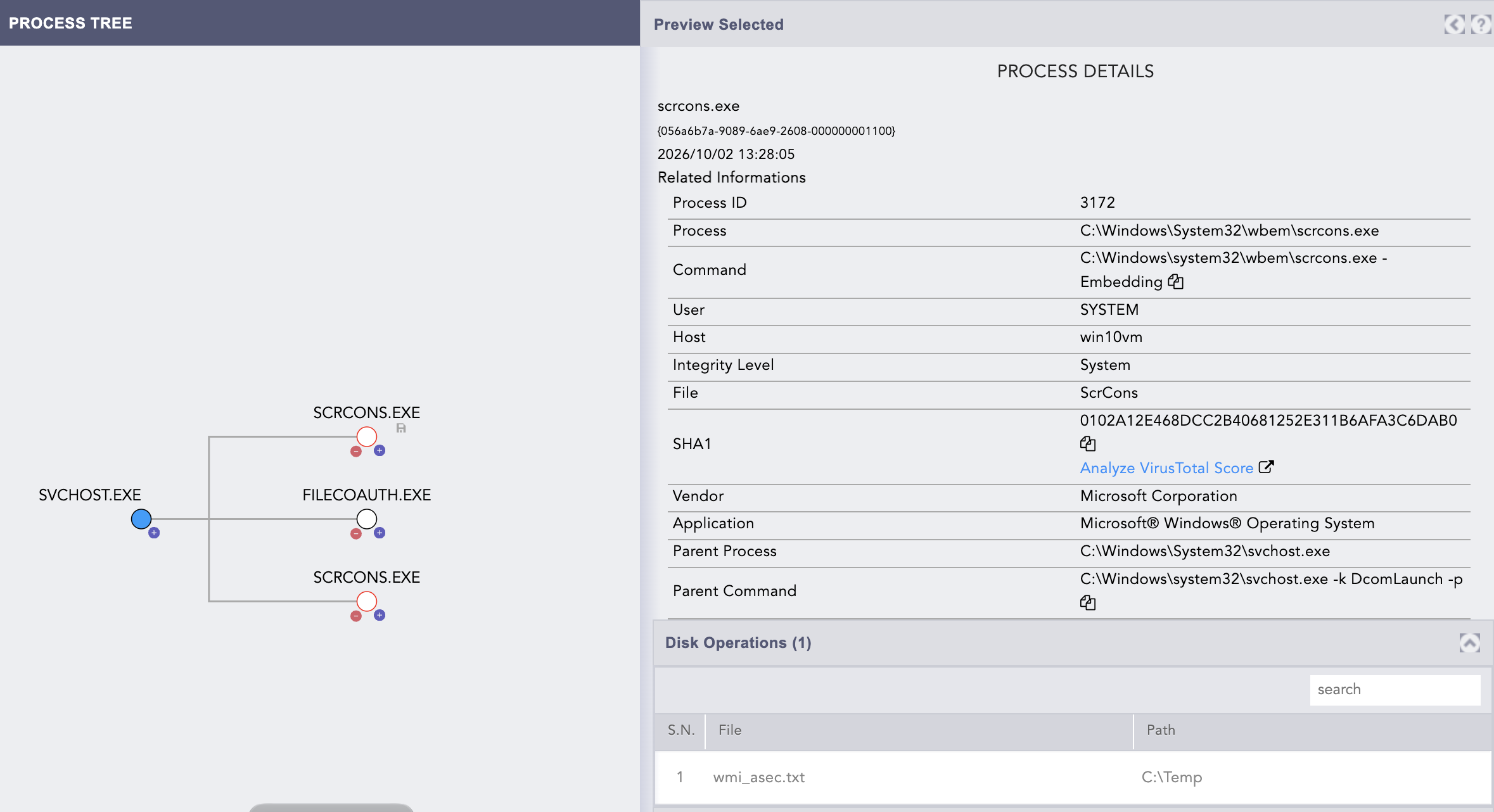
Although scrcons.exe hosts the script itself, the script can launch other programs to carry out further actions.
The following hunt identifies children of scrcons.exe like PowerShell, command shells, scripting hosts, and utilities such as schtasks.exe, regsvr32.exe, and rundll32.exe.
label="Process" label=Create
parent_process="*:\WINDOWS\system32\wbem\scrcons.exe"
"process" IN ["*\svchost.exe", "*\dllhost.exe","*\cmd.exe","*\powershell.exe", "*\pwsh.exe", "*\wscript.exe", "*\cscript.exe", "*\schtasks.exe", "*\regsvr32.exe", "*\mshta.exe", "*\rundll32.exe", "*\msiexec.exe", "*\msbuild.exe"]
Alert: WMI Persistence - Script Event Consumer File Write
The script may also create or overwrite a file. Even when its original code is embedded in the WMI repository, its subsequent actions can leave additional disk artifacts.
This alert uses Sysmon Event 11 to identify file creation or overwriting attributed directly to scrcons.exe at the specified path. It does not capture every kind of file modification.
norm_id=WindowsSysmon event_id=11 "process"="C:\WINDOWS\system32\wbem\scrcons.exe" -user IN EXCLUDED_USERS

Conclusion
WMI event subscriptions give attackers a way to maintain access across reboots using built-in Windows features. Because the subscription and even the payload can live in the WMI repository, detection needs to go beyond scanning for malicious files.
To reduce the risk, limit local administrator access, protect privileged credentials, and review permanent WMI subscriptions to confirm they serve a legitimate purpose. Validate the detection rules covered in this blog in your environment, ensuring the required logs reach your SIEM and the alerts fire as expected.
